
Welcome to the
AI desk PRO
Resources Hub!

Explore practical tools and ready-to-use prompts to accelerate the adoption of your corporate AI agents. Learn how to guide your teams from their very first interaction and access resources to demonstrate the value of AI desk PRO to your decision-makers.

content-image

Mastering the Art of Prompting with AI desk PRO

Looking to get the most out of AI Desk PRO? The Prompt Library enhances your experience by offering ready-to-use prompt templates for more efficient interactions with your AI-powered assistants.

Use and Customize your Prompts

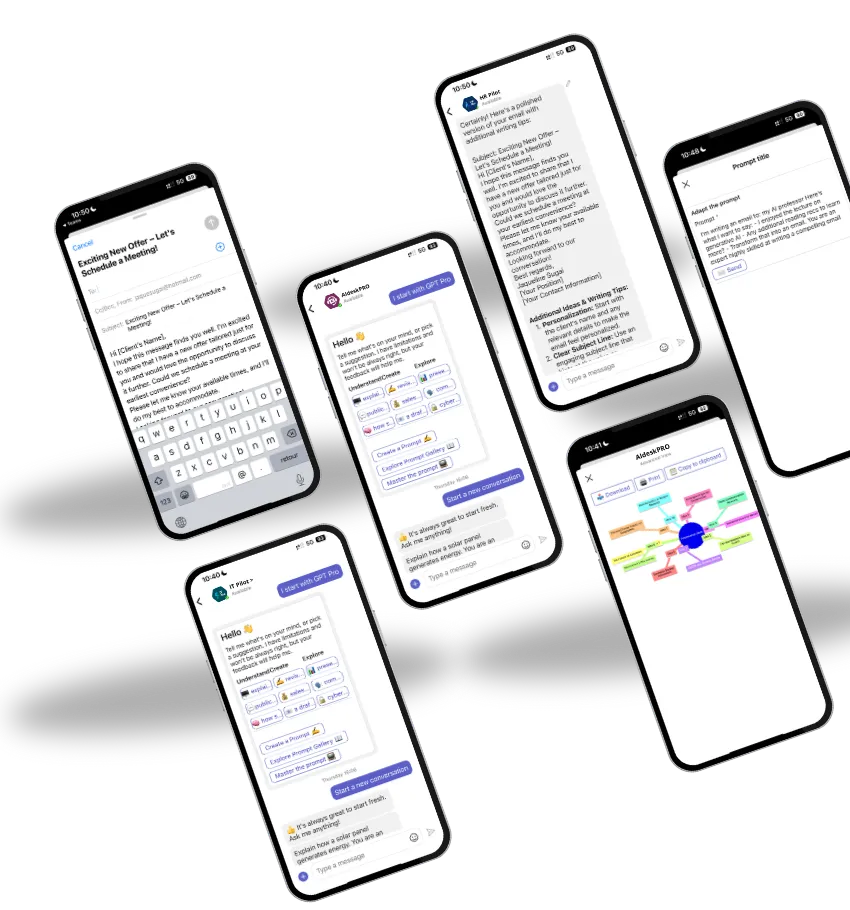
With AI desk PRO, make it easy for employees to get started with your corporate AI agents using personalized prompts directly visible on the agent's home card.


The administrator can create thematic prompts to guide users from their very first interaction: example questions, business use cases, or key actions the agent can perform.

💡 These smart suggestions help to:
🔹 Guide users toward the right queries from the start
🔹 Showcase the agent’s capabilities and the scenarios it handles
🔹 Improve adoption by making the experience clearer, faster, and more intuitive

Prompts thus become a true showcase of your corporate AI agent’s skills, turning every interaction into a smooth and controlled experience.

content-image

Estimate Your ROI with
AI desk PRO

Calculate the time and money your HR and IT departments can save with AI desk PRO. From automating repetitive tasks to reducing operational costs, see the potential impact on your organization.


Get AI desk PRO Approved in Your Company

All the arguments, data, and resources you need to convince your manager that AI desk PRO is a smart strategic choice.

ROI & Numbers

Calculators to estimate time and cost savings by department.

Real Use Cases

See how teams in HR, IT, Finance, and Support use AI desk PRO every day.

Free Whitepaper

Share a clear, professional document with your leadership.

Pitch Tools

Key arguments to support your pitch.
Questions & Answers

Everything you need to know

  • Discover AI desk PRO

    1. What is AI desk PRO?

    AI desk PRO is a platform for creating employee support agents directly integrated into Microsoft Teams, SharePoint, or as a webchat within your solutions. Each agent is designed for a specific area — for example: HR, IT, Payroll, or Internal Communication — and relies on the data sources and access rules specific to that field.

    These agents help your employees daily by:

    🔹 Instantly answering their questions about their scope (leave, equipment, payslips, internal procedures, etc.),

    🔹 Searching for answers in your reliable resources: business FAQs, internal documents, SharePoint, or connected applications,

    🔹 Automating certain actions such as leave requests, IT ticket creation, or form submissions,

    🔹 And ensuring the security and confidentiality of information via Microsoft 365 and Teams authentication.

    2. What is an AI desk PRO agent?

    A AI Desk PRO agent is not a generic assistant: it’s a specialized support agent designed for a specific use case (HR support, IT, onboarding, legal, etc.).

    Each agent learns the vocabulary, documents, and procedures specific to your company.
    It only provides access to authorized information: two employees can ask the same question but get different answers depending on their Microsoft 365 access rights.

    3. How does AI desk PRO work?

    AI Desk PRO is powered by Microsoft Azure OpenAI technology, hosted on a secure and GDPR-compliant infrastructure.

    Each agent combines your internal data, company policies, and our intelligent templates to provide accurate, targeted, and reliable answers to your employees.

    4.What are the benefits of AI desk PRO for my company?

    AI desk PRO helps your teams to:
    🔍 Quickly find the right information at the right time.
    💬 Reduce tickets related to recurring questions.
    🧩 Improve internal satisfaction through personalized responses.
    📊 Focus human support on high-value requests.
    🛡️ Secure knowledge while respecting access and confidentiality.

  • Creating and Using Agents

    1. How do I create an AI desk PRO agent?

    Creating an agent is simple and fast.

    AI desk PRO currently offers ready-to-use templates for HR and IT domains, covering the most common employee needs.
    You can also easily create an agent for other topics by adapting its behavior, tone, access, and data sources to your own needs (internal communication, payroll support, general services, etc.).

    💡 In just a few hours of work with an AI desk PRO expert, you can have a high-performing, relevant agent quickly adopted by your teams.

    2. What are the main features of AI desk PRO?

    AI desk PRO offers a complete set of features:

    🔹 Custom agents by department
    Create dedicated agents for each function — HR, IT, Payroll, Communication, etc. — to provide an experience tailored to each role.

    🔹 Understanding internal language
    Each agent learns the vocabulary, documents, and processes specific to your organization to respond naturally and contextually.

    🔹 Smart access management
    Responses are personalized according to each user’s Microsoft 365 rights, ensuring confidentiality and accuracy.

    🔹 Proactive communication (“push”)
    Send targeted messages (HR announcements, IT maintenance, internal news) directly in Teams, SharePoint, or your corporate channels.

    🔹 Smooth escalation to human support
    If the agent cannot resolve a request, it automatically creates a ticket or redirects to the right person.

    🔹 Microsoft security and compliance
    All data is hosted on Microsoft Azure, ensuring a high level of security, traceability, and GDPR compliance.

    3. How is an AI desk PRO agent implemented?

    Setting up an agent is quick and uncomplicated.
    In just a few steps, your agent is ready to use in Teams:

    🔹 1. Quick needs analysis – we identify the priority topics together (HR, IT, etc.)

    🔹 2. Template selection – you choose the most suitable agent model

    🔹 3. Customization – you adjust data, access, and tone of responses

    🔹 4. Deployment and testing – the agent is activated and tested with your teams

    🔹 5. Adoption – your employees are trained, and the agent becomes operational

    💡 In practice, just a few hours are enough to have a fully functional agent adopted by your users.
    Our team remains available if you want to go further with customization.

    4. Can AI desk PRO evolve with my company’s needs?

    Yes
    AI desk PRO is a scalable solution: you can add new agents, expand use cases, or connect other internal systems as your needs change.
    Our experts adapt your agents to follow the growth and priorities of your organization.

  • Communication and Support

    1. What is “push” communication?

    AI desk PRO agents can proactively send internal communications (“push”) to targeted groups or the entire company.
    Example: an HR department can use its agent to notify about a new policy, an event, or an internal announcement directly in the channels used by employees (Teams, intranet, etc.).

    2. How does escalation to human support work?

    When an employee feels that an agent has not met their need, they can submit feedback.

    The AI desk PRO agent then automatically initiates escalation to human support: creating a ticket in the internal system or sending an email to the relevant department. In this way, the AI remains an intelligent entry point, without ever blocking access to human support.

    3. How can I contact an AI desk PRO expert?

    AI desk PRO is not an application to download or test freely.
    To adopt the solution, it is necessary to schedule a meeting with an expert. Our teams will analyze your needs, present suitable use cases, and define with you the most relevant agents for your company.
    Full customization and 100% satisfaction.

  • Security and Compliance

    1.How does AI desk PRO ensure data security and confidentiality?

    AI desk PRO relies on Microsoft Azure OpenAI technology, ensuring:

    🔒 Secure hosting on Microsoft infrastructure.
    ✅ GDPR compliance and data confidentiality.
    🧩 Role- and user-based access control.
    🧠 Controlled learning: your agents’ data is never used to train external models.

    2. Does AI desk PRO support multiple languages?

    Yes.
    AI desk PRO can operate in multiple languages, allowing your multilingual employees to interact with their agents in the language of their choice.

Do you have a question? Contact us